How RAG & PostgreSQL Power Intelligent AI Chatbots
RAG & PostgreSQL
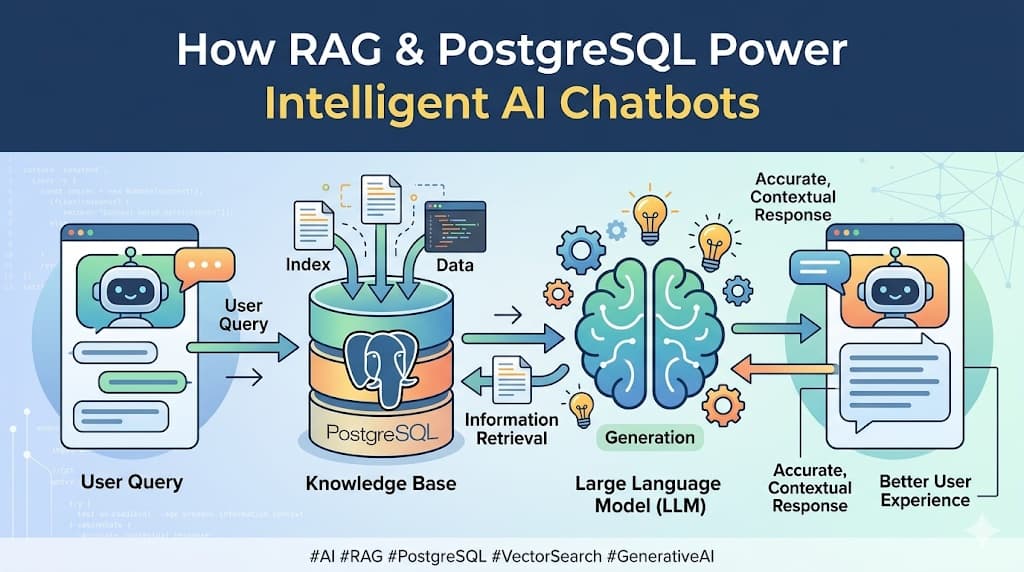
How RAG & PostgreSQL Power Intelligent AI Chatbots
Author: Abdullah Al Nahian Date: May 10, 2026 Tags: AI, RAG, PostgreSQL, pgvector, LLM, Chatbot, OpenRouter
Introduction
Imagine you build an AI chatbot for your SaaS platform. You integrate GPT-4 or Claude, deploy it, and a user asks:
"What is the pricing for the Pro plan?"
The AI replies:
"I'm sorry, I don't have specific information about that."
Frustrating, right? The LLM is incredibly powerful — it knows about history, science, code, and philosophy — but it knows nothing about your product. It was trained on public internet data, not your pricing page, your docs, or your business rules.
This is exactly the problem RAG solves. And PostgreSQL with pgvector is the database technology that makes it possible at scale.
In this blog, we will break down:
Why RAG exists and what problem it solves
How RAG actually works, step by step
Why PostgreSQL is the right database for this job
What happens when RAG can't find an answer
Part 1: Why Do We Need RAG?
The Core Problem with Plain LLMs
Large Language Models (LLMs) like GPT-4, Claude, or LLaMA are trained on massive datasets — billions of pages of text from the internet. They are incredibly good at reasoning, writing, and answering general questions.
But they have a hard limitation:
They only know what they were trained on. They know nothing about your specific platform, product, or business.
You cannot expect an LLM to know:
Your pricing plans
Your refund policy
Your product features
Your internal FAQs
Your company's specific workflows
Two Naive Solutions (And Why They Fail)
Option 1: Paste everything into the system prompt
You could write a 10,000-word system prompt that describes your entire platform. But LLMs have a context window limit (e.g., 128k tokens). If your documentation is large, it won't fit. And even if it fits, sending 100,000 tokens on every single request is extremely expensive.
Option 2: Fine-tune the model
Fine-tuning means retraining the model on your data. This teaches it your domain. But:
It costs thousands of dollars
It takes days or weeks
You need massive amounts of training data
Every time your docs change, you have to fine-tune again
The Right Solution: RAG
RAG — Retrieval-Augmented Generation — is a smarter approach. Instead of putting all your knowledge into the prompt or retraining the model, you:
Store your knowledge in a searchable database
When a user asks a question, retrieve only the relevant parts
Pass only those relevant parts to the LLM
The LLM generates an accurate, grounded response
You get the intelligence of the LLM combined with the specificity of your own knowledge base — at a fraction of the cost of fine-tuning.
Part 2: How Does RAG Work?
RAG has two phases: Indexing (happens once, when you upload docs) and Retrieval (happens on every user message).
Phase 1: Indexing — Teaching the Chatbot Your Knowledge
This is what happens when you upload a document to the chatbot dashboard.
Step 1: Text Extraction
The system reads your uploaded file (PDF, DOCX, plain text, or a URL) and extracts raw text.
pricing-guide.pdf
        ↓
"The Free plan includes 5 projects and 50 messages per month.
 The Pro plan costs $49/month and includes unlimited projects..."
Step 2: Chunking
The extracted text is split into smaller pieces called chunks. Each chunk is typically 300–512 tokens (roughly 200–400 words). Chunks overlap slightly (50 tokens) so that context is not lost at boundaries.
Chunk 1: "The Free plan includes 5 projects and 50 messages per month."
Chunk 2: "The Pro plan costs $49/month and includes unlimited projects and 5,000 messages."
Chunk 3: "The Enterprise plan is custom-priced with dedicated support and SLA guarantees."
Why chunk instead of storing the whole document? Because:
LLM context windows are limited
Smaller chunks = more precise retrieval
You only inject the 2–3 most relevant chunks, not the whole document
Step 3: Embedding (Converting Text to Vectors)
Here is where the magic happens. Each chunk is passed through an embedding model — a specialized AI that converts text into a list of numbers called a vector.
"The Pro plan costs $49/month"
        ↓  [Embedding Model]
        ↓
[0.23, -0.81, 0.44, 0.12, -0.37, 0.91, ... 1536 numbers]
This vector is a mathematical representation of the meaning of the text. Two sentences with similar meanings will have vectors that are mathematically close to each other — even if they use completely different words.
"How much does the Pro plan cost?"   → [0.21, -0.79, 0.46, ...]
"The Pro plan costs $49/month"       → [0.23, -0.81, 0.44, ...]
These two vectors are very close → high similarity score
Step 4: Storing in PostgreSQL
The text chunk and its vector are stored together in the database.
INSERT INTO document_chunks (tenant_id, document_id, content, embedding)
VALUES (
'tenant-uuid',
'doc-uuid',
'The Pro plan costs $49/month and includes unlimited projects.',
'[0.23, -0.81, 0.44, ...]'  -- 1536-dimensional vector
);
This process repeats for every chunk of every document you upload. Your entire knowledge base is now stored as searchable vectors.
Phase 2: Retrieval — Answering User Questions
This is what happens every time a user sends a message to the chatbot.
Step 1: Embed the User's Question
The user's question is passed through the same embedding model.
User: "What is the price of the Pro plan?"
↓  [Embedding Model]
↓
[0.21, -0.79, 0.46, 0.10, -0.35, 0.89, ...]
Step 2: Similarity Search in PostgreSQL
PostgreSQL (with pgvector) compares this query vector against all stored chunk vectors and finds the most similar ones — the closest matches in mathematical space.
SELECT content, 1 - (embedding <=> '[0.21, -0.79, 0.46, ...]') AS similarity
FROM document_chunks
WHERE tenant_id = 'tenant-uuid'
ORDER BY embedding <=> '[0.21, -0.79, 0.46, ...]'
LIMIT 3;
Result:
similarity: 0.97 → "The Pro plan costs $49/month and includes unlimited projects."
similarity: 0.84 → "The Pro plan also includes priority email support."
similarity: 0.71 → "You can upgrade to Pro from the billing settings page."
Step 3: Build the Prompt with Context
The retrieved chunks are injected into the LLM prompt as context:
SYSTEM PROMPT:
You are a helpful assistant for [Platform Name].
Use ONLY the provided context to answer questions.
If you cannot find the answer in the context, say "I don't have that information."
CONTEXT (retrieved from knowledge base):
The Pro plan costs $49/month and includes unlimited projects.The Pro plan also includes priority email support.You can upgrade to Pro from the billing settings page.
USER QUESTION:
What is the price of the Pro plan?
Step 4: LLM Generates a Grounded Response
The LLM reads the context and generates an accurate, specific answer:
"The Pro plan costs $49 per month. It includes unlimited projects
and priority email support. You can upgrade directly from the
billing settings page in your account."
No hallucination. No guessing. The answer is grounded in your actual documentation.
The Full RAG Flow — Visual Summary
INDEXING (once, on upload)
──────────────────────────────────────────────────────────
Document → Extract Text → Chunk → Embed → Store in PostgreSQL
RETRIEVAL (every user message)
──────────────────────────────────────────────────────────
User Question → Embed → Similarity Search (PostgreSQL)
↓
Top 3 Most Relevant Chunks
↓
[System Prompt] + [Chunks] + [Question]
↓
LLM → Accurate Answer
Part 3: Why PostgreSQL?
The Vector Storage Problem
To run RAG, you need a database that can:
Store vectors (lists of 1536 floats per chunk)
Run similarity searches efficiently across millions of vectors
Filter by tenant, chatbot, and document (relational queries)
Standard databases like MySQL were not built for this. MySQL has no native vector data type and no similarity search capability. You cannot run a "find the most similar vector" query in MySQL.
PostgreSQL + pgvector
PostgreSQL solves this with an extension called pgvector. Once installed, it adds:
A
vector(n)data type to store embeddingsSimilarity operators (
<=>cosine distance,<->Euclidean distance,<#>inner product)Index types (
ivfflat,hnsw) for fast approximate nearest-neighbor search
-- Enable the extension (once)
CREATE EXTENSION IF NOT EXISTS vector;
-- Store vectors
ALTER TABLE document_chunks ADD COLUMN embedding vector(1536);
-- Create an index for fast search
CREATE INDEX ON document_chunks
USING ivfflat (embedding vector_cosine_ops)
WITH (lists = 100);
-- Search: find top 3 most similar chunks
SELECT content
FROM document_chunks
WHERE tenant_id = 'abc'
ORDER BY embedding <=> '[0.21, -0.79, ...]'
LIMIT 3;
Why Not a Dedicated Vector Database?
There are dedicated vector databases like Pinecone, Weaviate, and Milvus. They are powerful, but:
pgvectorPinecone / WeaviateInfrastructureYour existing PostgresNew separate serviceCostFree (self-hosted)Paid per vector storedSQL joinsYes — join with users, tenants, docsNo — vectors onlyACID transactionsYesNoScale limitTens of millions of vectorsBillions of vectorsOps complexityLowHigh
For most SaaS chatbot products — even at serious scale — pgvector is more than enough. You keep everything in one database, avoid a separate service, and get full relational query power alongside your vectors.
Part 4: What If RAG Can't Find an Answer?
This is a critical design decision. When the user asks something very uncommon and no similar vectors are found, you have three options:
Option A: Honest Fallback (Recommended for Support Bots)
Set a similarity threshold (e.g. 0.75). If no chunk scores above it, the bot admits it doesn't know:
User: "Do you integrate with Salesforce?"
Bot:  "I don't have specific information about that in my knowledge base.
Please contact our support team at support@yourplatform.com."
Safe. Honest. No hallucination.
Option B: LLM General Knowledge Fallback
If RAG finds nothing, remove the context and let the LLM answer from its general training:
User: "What is a REST API?"
Bot:  "A REST API is an architectural style for building web services..."
Good for general assistant bots where general knowledge is still useful.
Option C: Hybrid with Disclaimer
Use LLM general knowledge but flag that it's not from your knowledge base:
User: "What programming language should I use?"
Bot:  "I don't have specific guidance about this in my knowledge base,
but generally speaking, Python is a popular choice for..."
Conclusion
RAG is not a single tool — it is a process that bridges the gap between a generic LLM and your specific platform knowledge. Here is the complete picture:
ComponentRoleEmbedding ModelConverts text (docs + questions) into vectorsPostgreSQL + pgvectorStores vectors and runs similarity searchesRAG RetrievalFinds the most relevant chunks for any given questionLLM (via OpenRouter)Reads the retrieved context and generates the final answer
Without RAG, your chatbot is a generic AI that knows nothing about your platform. With RAG, it becomes a knowledgeable assistant that answers accurately from your own documentation — without fine-tuning, without massive prompts, and without hallucination.
Key Takeaways
RAG exists because LLMs don't know your specific product — fine-tuning is too expensive, giant prompts are too slow
Indexing splits your docs into chunks, converts them to vectors, and stores them in PostgreSQL
Retrieval converts the user's question to a vector, finds the closest chunks, and injects them into the LLM prompt
PostgreSQL + pgvector is the right tool because MySQL has no vector support, and dedicated vector DBs add unnecessary complexity for most projects
Similarity threshold controls what happens when RAG finds no relevant data — the bot can admit it doesn't know, or fall back to general LLM knowledge