SSL/TLS Explained: What Actually Happens When You Open an HTTPS Website?
SSL/TLS
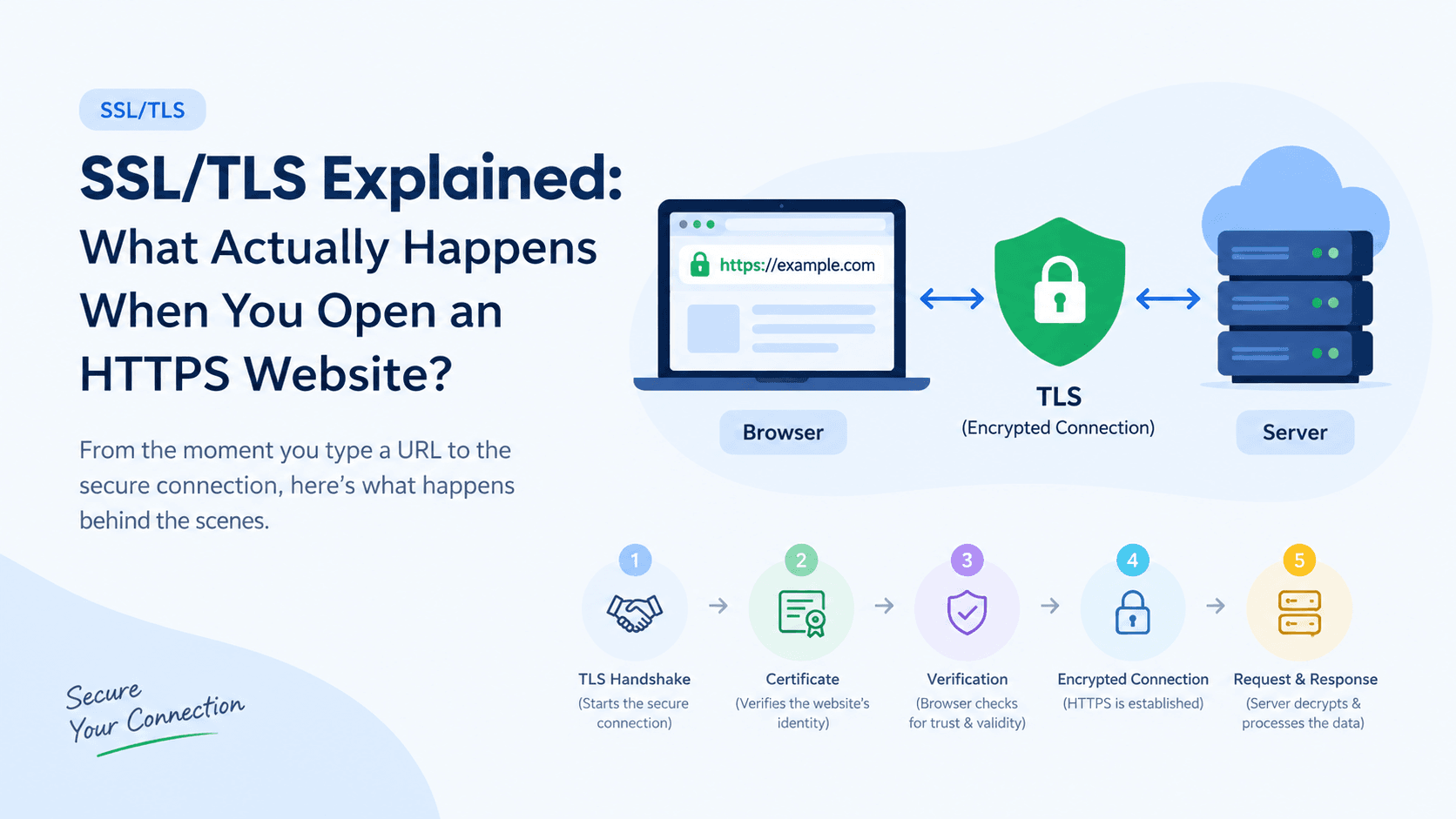
SSL/TLS Explained: What Actually Happens When You Open an HTTPS Website?
When you visit a website like:
https://example.com
you probably notice the https:// and the lock icon 🔒 in your browser.
But what actually happens behind the scenes?
How does the browser know that the website is trustworthy?
How does the connection become encrypted?
And how does the server receive your request securely?
Let's understand the complete idea with a simple example.
HTTP vs HTTPS
First, let's understand the difference.
HTTP
With normal HTTP:
Browser ────────────────> Server
HTTP data
The data travels without TLS protection.
Imagine sending a postcard through the mail:
┌──────────────────────┐
│ GET /profile │
│ User: Nahian │
└──────────────────────┘

Anyone handling the postcard
can potentially read it.
That's not suitable for sensitive communication.
HTTPS
HTTPS adds TLS protection to HTTP:
Browser ─────── 🔒 TLS ───────> Server
Now imagine putting your letter inside a locked box before sending it.
Browser
│
│ 🔒 protected
▼
Internet
│
▼
Server
Only the intended server can properly process the protected communication.
That's the basic idea of HTTPS.
A Simple Real-World Example
Imagine you want to enter a private office.
The office has a security guard.
Before entering:
You check that you're at the correct office.
The guard proves that this is the real office.
You establish a secure way to communicate.
You enter and start talking privately.
HTTPS works in a similar way.
When you open:
https://example.com
your browser and the server go through a process called a TLS handshake before normal HTTP communication begins.
What Happens Step by Step?
Let's follow the journey.
Step 1: You Enter the Website
You type:
https://example.com
and press Enter.
The browser knows:
"This website should communicate with me using HTTPS."
It therefore needs to establish a secure TLS connection with the server.
Step 2: Browser Starts a TLS Handshake
The browser contacts the server and says, roughly:
"Hello. I want to establish a secure connection with
example.com."
This starts the TLS handshake.
You don't need to understand every technical message in the handshake yet.
For now, just remember:
The TLS handshake is the process used to establish a secure connection between the browser and server.
Step 3: Server Shows Its Certificate
The server sends its TLS certificate to the browser.
Think of the certificate like the server's identity card.
For example:
Certificate
-------------------------
Domain: example.com
Issued by: Let's Encrypt
Valid: Yes
Public Key: ...
-------------------------
The certificate basically says:
"I am authorized for
example.com."
The certificate is issued by a trusted Certificate Authority (CA) such as Let's Encrypt.
Step 4: Browser Checks the Certificate
Now the browser checks the certificate.
For example:
Is it for example.com? ✓
Is it expired? ✓
Is it trusted? ✓
Is the certificate valid? ✓
If everything is okay, the browser continues.
If the certificate has a serious problem, the browser may show a warning such as:
Your connection is not private
This is one reason you see the lock icon 🔒 on properly configured HTTPS websites.
Step 5: A Secure Connection Is Established
After the TLS handshake completes, the browser and server have established a secure connection.
Now the browser can send HTTP data through that protected connection.
For example, the browser may want to send:
GET /profile
Host: example.com
But this HTTP data is protected by TLS while traveling across the network.
Conceptually:
Browser
│
│ HTTP
▼
🔒 TLS protection
│
▼
Internet
│
▼
Server
│
│ TLS decrypts
▼
HTTP request
So HTTPS is essentially:
HTTP + TLS
Step 6: Server Receives the Request
The server receives the protected communication and processes it.
At the server's TLS endpoint, the TLS layer decrypts the protected data.
The application can then work with the HTTP request normally:
GET /profile
Host: example.com
The application might respond:
HTTP/1.1 200 OK

<html>
...
</html>
That response is then protected by TLS before being sent back to the browser.
Application
│
│ HTTP response
▼
TLS encryption
│
│ 🔒
▼
Internet
│
▼
Browser
The Complete Picture
Putting everything together:
You enter:

https://example.com
│
▼
Browser
│
│ 1. Start TLS handshake
▼
Server
│
│ 2. Sends certificate
▼
Browser
│
│ 3. Verifies certificate
▼
│
│ 4. TLS handshake completes
▼
Secure TLS connection
│
│ 🔒 HTTP request
▼
Server
│
│ 5. TLS decrypts
▼
HTTP request
│
▼
Application
│
│ 6. Creates response
▼
HTTP response
│
│ TLS encrypts
▼
🔒
│
▼
Browser
So What Does the Lock 🔒 Actually Mean?
When your browser shows:
🔒 https://example.com
it mainly means that the browser has successfully established a secure TLS connection with the website and the certificate passed the browser's validation checks.
It does not simply mean:
"This website is trustworthy."
A valid HTTPS certificate primarily proves that the connection is associated with the domain represented by the certificate and enables encrypted communication.
The Three Things to Remember
You don't need to remember all the technical details yet.
Just remember these three things:
1. Certificate
The certificate helps the browser verify:
"Am I communicating with the right website?"
2. TLS Handshake
The TLS handshake establishes:
"How will the browser and server communicate securely?"
3. TLS Encryption
TLS protects the HTTP data while it travels:
Browser
│
│ 🔒 protected HTTP
▼
Internet
│
▼
Server
That's why we use:
HTTPS
instead of plain:
HTTP
In One Sentence
When you open an HTTPS website, the browser first establishes a TLS connection with the server, verifies the server's certificate, and then sends and receives HTTP data through that protected connection.